% ============================================================ PART I
# Words & Structure
[Kick] PART ONE OF SIX · THE QUIET FOUNDATIONS
[Lead] An .ord file is plain text with opinions. Everything you will see in these pages — the columns, the charts, the dark dashboards — is carried by ordinary lines you could type in any editor, styled by a single master style sheet at the top of the file.
Six parts build upward from these quiet foundations: prose and outlines first, then figures and computed media, the column engine, the presentation set, the style sheet itself, and at last the framed page. All of it is one plain-text file, written once for $company
## Inline Formatting
The span toolkit works anywhere prose does: **bold**, *italic*, ***bold italic***, __underline__, and their combinations like **__weighted and ruled__**. Superscripts and subscripts nest into equations — E=mc^2, x^{n+1}, H_2O, a_{n-1} — and standalone fractions such as 1/2 and 3/4 typeset themselves. Small caps arrive with {SC:a marker}, an em dash with a double hyphen -- like so -- and a mid-line @@ becomes a bullet.
Named character styles carry semantics: a {=term=design variable} is declared once in the style sheet and referenced by name wherever a color, length, or phrase should stay consistent. The token {=code=$accent} in this very sentence expanded to its value when the page was rendered, and the publisher's name in the opening paragraph is the variable {=code=$company} — change one line and every mention follows.[^vars]
Inline tags gate conditional text; toggling a tag re-publishes a different edition of the same file.[idx:Concepts:Variables][idx:Concepts:Inline tags]
{:1: This paragraph is visible because the Reviewer tag is enabled in the style sheet.}
{:2: This paragraph is excluded from output entirely — the Draft tag is on the excluded list — so it prints only in draft builds.}
Links work three ways: outward to https://example.org, inward to a section like [the column engine](#The Column Engine), and by number with [](#3.1).
## Lists & Outlines
One relative value indents the whole outline: the bullet role carries {=code=+36+} in its margin field — thirty-six points that cascade again at every depth, and the sheet's tab distance is pinned to the same thirty-six so every item's text begins exactly where the next level's bullet will.
- Unordered items take a hyphen
- A second item, long enough to wrap and show the hanging indent that list continuation lines receive automatically
+ A plus sign draws the alternate bullet
1. Ordered lists count themselves
2. In numerals, letters, or Roman numerals
a. Nested lettering
i. Nested Roman
- Top level again
- Indentation nests bullets
- As deep as the outline goes
## Quotations & Callouts
> A bare quotation takes a quiet left rule and nothing else. It ends when the lines stop leaning on the angle bracket.
> > Quotes nest inside quotes for dialogue or cited citation.
>note> A callout is nothing but a named block style, so each can wear its own shape. The note keeps the classic form — a colored bar at the far left over a quiet field.
>warning>Field advisory> The warning changes voice entirely: a tinted field, a small-caps title, and a sans-serif body face, all assigned by the sheet.
>tip> Rules above and below, a centered italic line — the epigraph shape, one style away.
>card> A card is the neutral container: white fill, hairline border, rounded corners. Anything can live inside one.
[Pull] Presentation is a property of the style sheet, not of the prose — the same file re-skins without touching a word.
## Rules, Ornaments & Space
Three runes draw three different rules, each mapped in the style sheet. A dash rule:
---
An asterisk rule mapped to an SVG ornament:
***
An underscore rule as a short heavy accent:
___
And where a gap should be exact, SPACE|24 reserves precisely twenty-four points — like this:
SPACE|24
— no blank-line guesswork.
## Margins & Asides
[Aside] Margin notes are presentation styles with place=margin — they reserve no height in the flow. | № 1
This page keeps a wide right margin, and the paragraph you are reading has a companion note riding beside it. The section marks along the outer edge of every section heading are style icons — glyphs attached to the heading style itself, not typed into the text.
[Aside] The § wayfinders beside each section heading come from the heading style's icon field. | № 2
Footnotes are the other marginal voice: a marker in the text[^fn] and its definition anywhere in the file meet at the bottom of the page, under a measured rule.
## Scripture & Citation
The verse engine recognizes references in running prose and sets the text itself, styled by its own pair of styles. Consider Psa 19:1 — typed as seven characters, delivered in full.
## Composed Documents
One document can embed another — whole, or a single section — with heading levels adjusted to fit the host outline:
{sameLevel}
The source of this file also contains comment lines beginning with a percent sign. You cannot see them, which is the point.
[^vars]: Variables cascade across style sections, so alternate looks of one document share a vocabulary.
[^fn]: Mode 3 places footnotes at the bottom of the page; endnote and inline modes are one property away.
% ============================================================ PART II
# Figures & Media
[Kick] PART TWO OF SIX · PICTURES, CODE & COMPUTED FIGURES
[Lead] Anything that is not prose is a figure: images with float and crop behavior, syntax-lit code, ASCII diagrams promoted to vector art, circuits, charts fed by tables, and Python that runs at render time.
Figures are cited, not counted by hand. The mark below is @fig:mark, and the sectioned instrument beside the next paragraphs is @fig:sext — renumber them by reordering, and every reference follows.
## The Image Model
{scale=0.5 align=center}
{align=right floatWidth=44}
A floating figure declares its width as a percentage of the column; the text you are reading is wrapping through the remainder, and will widen back to full measure the moment it clears the float's wake. Alignment, margins, and the height of the wrap zone are all attributes on the image line.
{align=right floatWidth=26 floatHeight=column}
Floats can also pin a sidebar: with floatHeight=column the gutter persists to the bottom of the column even after the image ends, which is how magazine sidebars hold their shape.
- The image itself paints at natural size
- The wrap zone below it stays reserved
- Every following line keeps the narrow measure
{align=left wrap=image width=160 height=112 fit=cover radius=8 border=1:$rule shadow=3}
Raster images crop as well as scale. This photograph is forced through a 160 by 112 point box with fit=cover — filled and center-cropped — then rounded, ruled, and shadowed, all from attributes.
{width=160 height=112 fit=contain border=1:$rule align=center}
Full bleed is the last word in image placement — edge to edge, margins ignored, flow preserved. The banner below spans the physical page while the text around it keeps the margins:
{bleed}
## Code, Lit
```python`Reference implementation
def meridian(readings):
'''Fold a day of readings into one figure.'''
total = sum(r.value for r in readings if r.valid)
return total / max(1, len(readings))
```
```cpp`The same idea, compiled
double meridian(const std::vector<Reading>& rs) {
double total = 0; int n = 0;
for (const auto& r : rs)
if (r.valid) { total += r.value; ++n; }
return n ? total / n : 0.0;
}
```
Each language keys its own pair of styles — the dark slab, the numbered gutter, and the mono face belong to the sheet, the fences to the text.
## Diagrams & Circuits
ASCII art is promoted to vector art, and the vocabulary runs deep: boxes and pill nodes, diagonal runs, shaded cells, open endpoints, arrows in all four directions, and plain words riding the wires as labels — the whole network, typed.
```diagram The observing network {scale=70}
o field telemetry
|
v
+-----+-----+ +-----------+
| Field | | Ingest | .---------.
| array +----->| queue +----->( uplink )----.
+-----+-----+ +-----+-----+ '---------' \
^ | v
| v +-----------+
| +-----------+ | Archive |
'------------+ Planner |<------------------+ |
retask +-----------+ +-----------+
```
The notation extends to electronics with a full component library — sources, passives, semiconductors, transducers. The station's alarm loop, typed the same way:
```circuit Station power & alarm loop {scale=85}
+--+batte+--+fuseb+--+spsto+--+--------+--------+
| | | |
| FUSE1 SW1 + + LAMP1 +
| BATT1 c l s
| a C1 a p
| p m e SPK1
| a p a
| c o k
| + + +
| | | |
+-----------+-----------------+--------+--------+
|
+eg
```
Semiconductors route by pin: a transistor's base arrives from the left, collector and emitter leave high and low on the right. A thermistor divider biases the base through a resistor, and the collector drives the warning lamp — the station's thermal switch:
```circuit The thermal switch {scale=85}
Vcc ---+-------------------------+
| |
+ +
t LED1 l
h e
e Therm1 d
r :
m :
+ +
| |
| |
| NPN1 |
|
| R1
+-----+resis+--------+npn
|
+
r |
e R2 |
s |
i |
s |
+ |
+----+--------------------+
|
+eg
```
And it reaches logic: gates take their inputs a row above and below, so a half adder is nine lines of text:
```circuit Half adder {scale=95}
A o----*--------+
| :Xor+-----o Sum
B o--*-)--------+
| |
| |
| |
| +--------+
| And:+-----o Carry
+----------+
```
## Charts, Fed by Tables
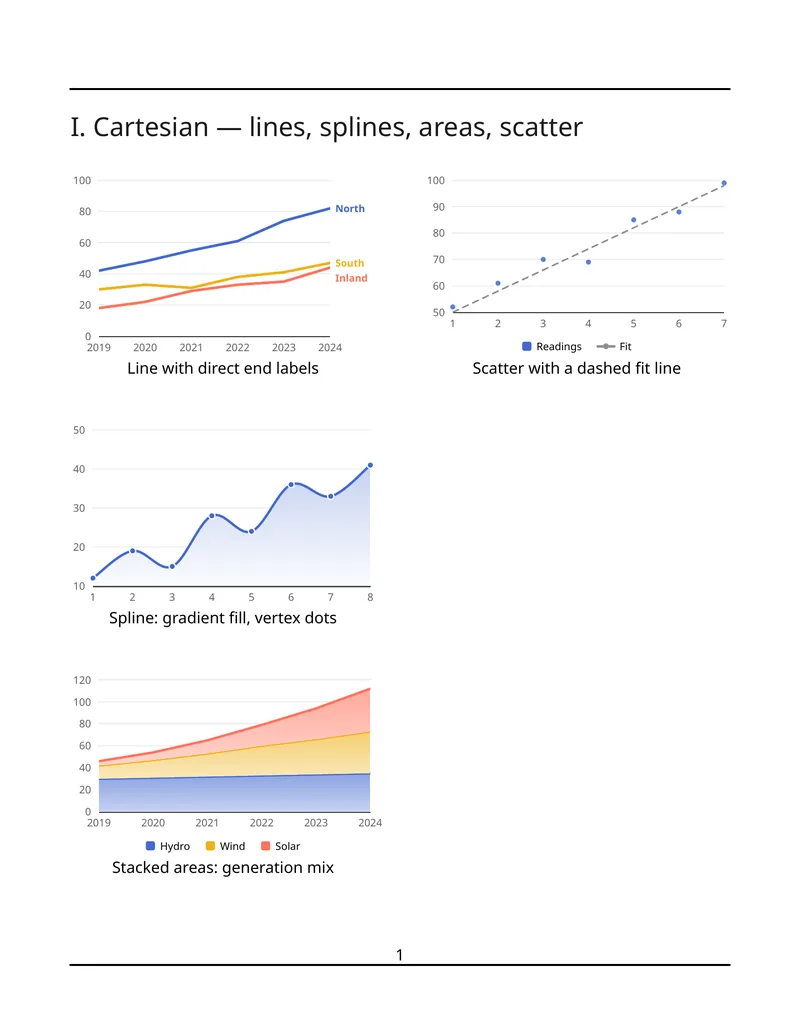
A chart is one directive reading the table above it; markers in the header row assign series types — the family runs bars grouped, stacked, and percent; lines, splines, and areas; scatter, pies, and concentric donuts. One chart-style line in the master sheet sets the palette, the grid, and the typography for every chart in this gallery — and hides each source table, so the numbers live in the file while only the figures reach the page. Braces on a single directive, or an override in a single header cell, retune one chart without touching the rest:
COL|2|50|50|6
| [BarCategories] Quarter | Field [Bar] | Lab [Bar] | Marine [Bar] |
| Q1 | 34 | 21 | 9 |
| Q2 | 41 | 24 | 12 |
| Q3 | 52 | 22 | 17 |
| Q4 | 61 | 27 | 21 |
CHART|Deployments by quarter, grouped|0.6|0.92
| Year [X] | Coverage [Area] | Drift [Spline] <$accent lw=1.6 dash> |
| 2021 | 62 | 14 |
| 2022 | 68 | 12 |
| 2023 | 75 | 9 |
| 2024 | 83 | 7 |
| 2025 | 88 | 6 |
CHART|Coverage rises as drift falls|0.58|0.92|{legend=end}
| Hours [X] | Readings [Scatter] | Fit [Line] <$muted lw=1.4 dash> |
| 1 | 52 | 50 |
| 2 | 61 | 58 |
| 3 | 63 | 66 |
| 4 | 76 | 74 |
| 5 | 80 | 82 |
| 6 | 92 | 90 |
CHART|Observation hours against yield, with fit|0.62|0.92
| [Names] Region | Share [Pie] |
| Highlands | 34 |
| Coast | 27 |
| Basin | 22 |
| Ranges | 17 |
CHART|Network share by region|0.72|0.8
| [HBarCategories] Station | Done [StackedHBar] | Active [StackedHBar] | Queued [StackedHBar] |
| North | 45 | 12 | 8 |
| Coast | 38 | 18 | 14 |
| Basin | 52 | 6 | 4 |
CHART|Task status, stacked by station|0.45|0.92|{labels=1}
| [Names] Class | 2026 [Donut] | 2021 [Donut] |
| Field | 128 | 63 |
| Lab | 74 | 41 |
| Marine | 52 | 18 |
| Airborne | 21 | 6 |
CHART|The instrument fleet — 2026 over the 2021 ring|0.72|0.8|{center=total centersub=instruments}
COL|1
## Computed Figures
A Python figure runs a script at render time, drawing straight into the page with the engine's vector API. The block's body is the script's input — the chart below is a title line and seven data lines, nothing more; the axis scale, the gridlines, and the highlighted maximum are all computed.
{scale=1.0}
title: Field readings · season means
Apr 52
May 61
Jun 78
Jul 95
Aug 88
Sep 64
Oct 41
~~~
A script may instead compute its whole picture and return raw SVG, transparent over the page. Here the document holds nothing but five pendulum constants per line — two frequencies a hair off resonance, two phases, a damping — and the script swings them into eighteen thousand segments:
{scale=1.0}
3.001 2 1.5708 0 0.0065
2 3.0016 0 0.7854 0.008
~~~
The same channel typesets mathematics — a one-line embed hands the expression to the math engine:
{scale=1.1}
i\hbar \frac{\partial}{\partial t} \Psi(x,t) = \left[ -\frac{\hbar^2}{2m} \frac{\partial^2}{\partial x^2} + V(x,t) \right] \Psi(x,t)
~~~
{scale=1.1}
\frac{1}{\pi} = \frac{2\sqrt{2}}{9801} \sum_{k=0}^{\infty} \frac{(4k)!(1103 + 26390k)}{(k!)^4 396^{4k}}
~~~
{scale=.9}
\frac{\partial (\rho \mathbf{u})}{\partial t} + \nabla \cdot (\rho \mathbf{u} \cdot \mathbf{u}) = -\nabla p + \mu \nabla^2 \mathbf{u} + \frac{1}{3} \mu \nabla (\nabla \cdot \mathbf{u}) + \rho \mathbf{g}
~~~
% ============================================================ PART III
# The Column Engine
[Kick] PART THREE OF SIX · FLOW, BALANCE & INDEPENDENCE
[Lead] One directive opens a multi-column region; a second closes it. Between them: flowing text, balanced text, or fully independent panels — decorated, tinted, and bled to the page edge.
Three modes cover the ground. Flow fills each column before starting the next; balanced distributes so columns end together; independent gives every column its own content.
## Flow & Breaks
COL|2|50|50|6
Flowing columns read like a newspaper: down the first leg, up to the top of the second. This region was opened with a single COL directive naming two equal columns and a six percent gutter.
Mid-paragraph splitting respects widow and orphan minimums set in the sheet, so a column never strands a single line[^col]. Everything prose can do — spans, links, footnotes — works inside a leg.
COLBRK
A COLBRK forced this sentence to the top of the second leg. Breaks can also ride on styles: any style may carry the column-break effect, so a recurring label starts a fresh leg without a directive in the text.
The engine paginates regions automatically — when both legs of a page are full, the region continues overleaf with the same geometry.
COL|1
## Balance
COL|3|bal|33|34|33|4|minPar=0
Balanced mode measures the whole region and divides it so the columns end within a line of each other, which is what a closing spread wants. This region runs three legs with a narrow gutter. Allowing paragraph splits sharpens the balance further, because the divider can fall mid-paragraph instead of hunting for a boundary. The result reads as one measured band of text, whatever the content happens to be.
COL|1
PAGEBRK
## Pictures in the Legs
COL|2|55|45|6
{align=left floatWidth=55}
Media obeys the leg it lives in. This schematic floats left inside the first column, so its wrap zone is measured against the column's own edge — the same float grammar as Part II, at column scale. Once the prose clears the float's wake it widens back to the leg's full measure; the figure beside this text is @fig:colfloat.
COLBRK
{scale=0.42 align=center}
An inline figure in a column adopts the narrower measure — centered at the head of the second leg, caption beneath, numbered in the List of Figures like every other citable image.
COL|1
## Unequal Measures
COL|3|bal|26|37|37|3|gaps=2,9|minPar=0
A narrow opening leg, two wide ones, and unequal gutters: widths are per-column percentages, and the gaps= option sets each gutter separately — two percent after the first leg, then nine of it before the last.
The balancer treats the trio as one region: it measures the whole run of text, then places the dividers so all three legs bottom out together, splitting mid-paragraph where the minimums allow.
Five knobs on one directive — count, mode, widths, gaps, and the splitting minimums — and every combination stays plain text in the file.
COL|1
## Independence
COL|3|indep|33|33|34|4|bg=#FFFFFF,$panel,#FFF4EC|border=0.8:$rule:8|pad=9|boxfill=0
**Panel one.** Independent columns are parallel documents: each leg takes its own content, separated by COLBRK.
COLBRK
**Panel two.** Per-column options decorate each leg separately — this trio carries three different fills under one border style.
COLBRK
**Panel three.** With boxfill off, each box hugs its own content.
COL|1
PAGEBRK
COL|2|30|70|7|bg=grad(linear,180,#17667A,#0E4152),#00000000|fg=#FFFFFF,#232830|pad=12|extent=full|bleed
**The rail.** This teal panel is a column background with extent=full and bleed — it runs the full height of the page and out through the left trim edge, while its text stays inside the margins. A gradient is a legal fill anywhere a color is.
Reversed ink is per-column: this leg's text is flipped to white by an fg option, and the body leg keeps its inherited ink.
COLBRK
## Decoration & Bleed
**The body.** The wide leg carries the running text. Split-panel chapter openers, colored rails, and divider pages are all this one directive wearing different options — no artwork required.
Per-gap widths, inner padding, and per-column borders round out the decoration set; the fills accept the same spec as every background in the system: solid, token, gradient, image, or SVG.
COL|1
PAGEBRK
## Regions Driven by Style
[Duet] This italic line is a trigger: its style carries a column spec, so the paragraphs after it flow into two tinted, balanced legs — until the next heading closes the region.
A style-driven region needs no directives in the body at all. The trigger spans full width above its columns by default, and the region ends according to a heading-break rule the style chooses.
The same spec on a heading style turns every section of that level into columns; on a body style, it turns a paragraph run. Either way the document stays plain.
[NewCol] And a styled label —
— this one carries the column-break effect — starts a fresh leg wherever it lands.
[^col]: Footnotes set inside a column region still gather at the page bottom, full width.
% ============================================================ PART IV
# Data, Presented
[Kick] PART FOUR OF SIX · THE PRESENTATION ENGINE, AFTER DARK
[Lead] A presentation is a styled table: the document holds pipe-separated records, and the style decides whether they render as a statistic band, cards, a ledger, steps, or a live table with meters. Change the style, and the same records change costume.
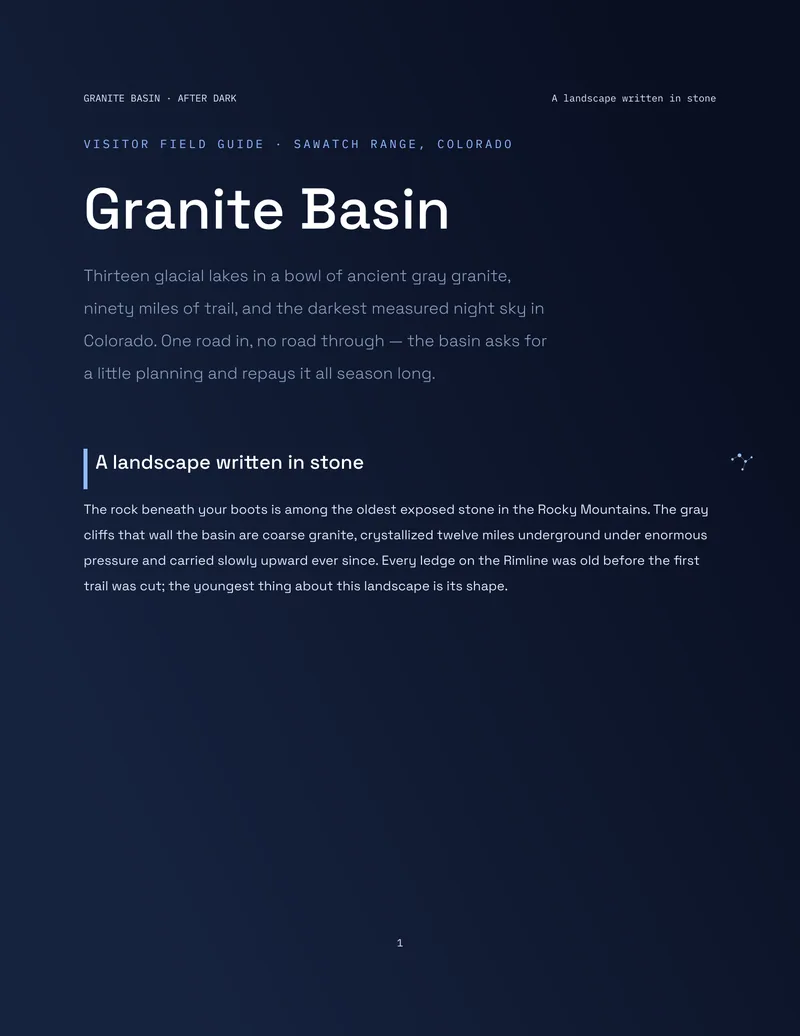
These pages also switch the page itself: a heading effect advanced the running header set, and this part's set paints a gradient over the full page with reversed ink — the dark room.
## The Statistic Band
[Band]
941 | Instruments afield | across four watersheds
99.2% | Readings accepted | after validation
17 yrs | Continuous record | longest unbroken series
## Indicator Cards
Cards are the packer flowing right with a wrap rule; the ring meters read the leading number of each record.
[Kpi]
87% | Coverage | of stations reporting daily
64% | Adoption | of the revised field protocol
92% | Retention | of season staff, year on year
## Capacity, in Glyphs
The same meter machinery draws a dozen shapes; here, pips.
[Cap]
7/10 | Field kits staged
4/5 | Relays provisioned
6/10 | Baselines rerun
9/10 | Sites winterized
## Photo Cards
The card row again — this time each record opens with a bleed image that rides over the card's padding to its edges.
[Photo]
{bleed height=56 fit=cover} | Highline | Twenty-two stations above the tree line.
{bleed height=56 fit=cover} | Coastal | Solar relays out on the headlands.
{bleed height=56 fit=cover} | Basin | The long-series veterans of the network.
## Ledgers & Leaders
[Led]
North array, full service | 412
Coastal relays, solar | 288
Basin loggers, cabled | 156
High-station heliographs | 85
The fill between the columns is a style choice — dots above, then dashes, then a solid rule:
[LedDsh]
Instruments due for calibration | 37
Firmware revisions pending | 9
[LedLn]
Season budget, committed | 81%
Sites with winter access | 44 of 61
## Sequences
[Step]
Sight | Fix the station against two known marks before first light.
Sample | Take the morning series at the interval the log prescribes.
Seal | Close the record with the operator's cipher and the day's checksum.
## Splits, Three Ways
One group, three record shapes: the style's splits list hands each record its own layout — the records themselves are just fields.
[Vary]
Forty–sixty | The group's default proportions: a label panel beside a wider body panel, divided by a hairline.
Sixty-five–thirty-five | The second entry in the splits list flips the proportions for this record alone.
Stacked | And the third entry drops its fields into a column — same content, a different shape.
## Stacks, Two Ways
A stack leads with its first field and steps the rest down the emphasis ladder; reordering the slots flips the hierarchy without touching the record.
[Big] 1,204,553 | readings this season | validated nightly
[BigL] 41 | winters on the high line
## Layered Text
A stack becomes a lockup when its two fields are pulled deep into each other: an overlap distance, a choice of which field rides in front, and a blend for the crossings. Overprint first — the serif echo sits above the headline and multiplies into it, the inks deepening where they touch:
[LayM] MORNING SERIES | and the evening check
The knockout: the echo again rides in front, but now it carries a thin halo of the card's own color, slicing a clean channel through the headline wherever the two cross:
[LayH] STATION LIGHTS | burn through the fog
And the treatment that refuses to choose: at every crossing the echo threads over or under the headline, letter by letter, to a set balance — no image, just two fields and a style.
[Weave] what the moment forgets | The archive remembers
## The Console
A presentation table: header from a row style, hairline dividers from bars, and three meter columns — a bar, a signed arrow, a traffic dot.
[Console]
Station | Load | Trend | Status
Array North | 92% | +6% | 88%
Coastal Relay | 76% | +2% | 71%
Basin Logger | 58% | -4% | 47%
High Station | 33% | -9% | 22%
## Targets & Ranges
Zebra rows from cycling row chrome; bullet, dumbbell, and range meters against white ticks.
[Targets]
Throughput | 72;90 | 58;83 | 20;80;55
Latency | 64;80 | 71;52 | 10;60;38
Coverage | 88;95 | 80;91 | 40;99;88
## The Dial Drawer
Four more shapes from the same drawer — a half-gauge, a battery, a hundred-cell waffle, and a signed diverging bar — each still just a number in a field.
[Dials]
Depot | Fuel | Cells | Season | Drift
Array North | 72% | 4/5 | 68% | +4%
Coastal Relay | 45% | 3/5 | 54% | -2%
Basin Camp | 88% | 5/5 | 81% | +9%
## Records & Media
An image is a first-class field: these rows crop their thumbnails to the slot.
[Media]
{height=54 fit=cover} | **Array North.** Twenty-two stations on the high line, resurveyed this season and feeding the morning synthesis.
{height=54 fit=cover} | **Coastal relays.** Solar, uncrewed, and lately talkative — the new firmware doubled their reporting cadence.
{height=54 fit=cover} | **Basin loggers.** Cabled veterans of seventeen winters; the longest unbroken series in the network.
[Hero]
{bleed height=88 fit=cover} | The evening line | A first-slot image with bleed rides over the card's padding to its edges — the photo-header card, composed entirely in the style sheet.
## The Legend
Rows can inject fields from the style itself: each row style contributes a colored dot and a small-caps name, so the document holds three plain sentences and nothing else.
[Legend]
All arrays reporting within tolerance.
Two relays throttled by weather.
One logger awaiting the spring thaw.
PAGEBRK
SPACE|200
[Banner] Nine hundred forty-one | instruments currently in the field
SPACE|36
[Lead] The chrome of that band bleeds to both trim edges while its text keeps the column — the same trick as the rail, worn by a presentation group.
% ============================================================ PART V
# The Style Engine
[Kick] PART FIVE OF SIX · TABLES, SELECTORS & THE SHEET ITSELF
[Lead] This part turns the machinery on itself: data tables with formulas, positional selectors that style by position rather than by name, sub-block styling, boxes, icons, and marks.
Nothing on these pages was styled by hand in the text. Every look you have seen — the page moods, the part palettes, the dark room behind us — cascades from the single style block at the top of the file, and this part shows the sharpest tools in it.
## The Pipe Table
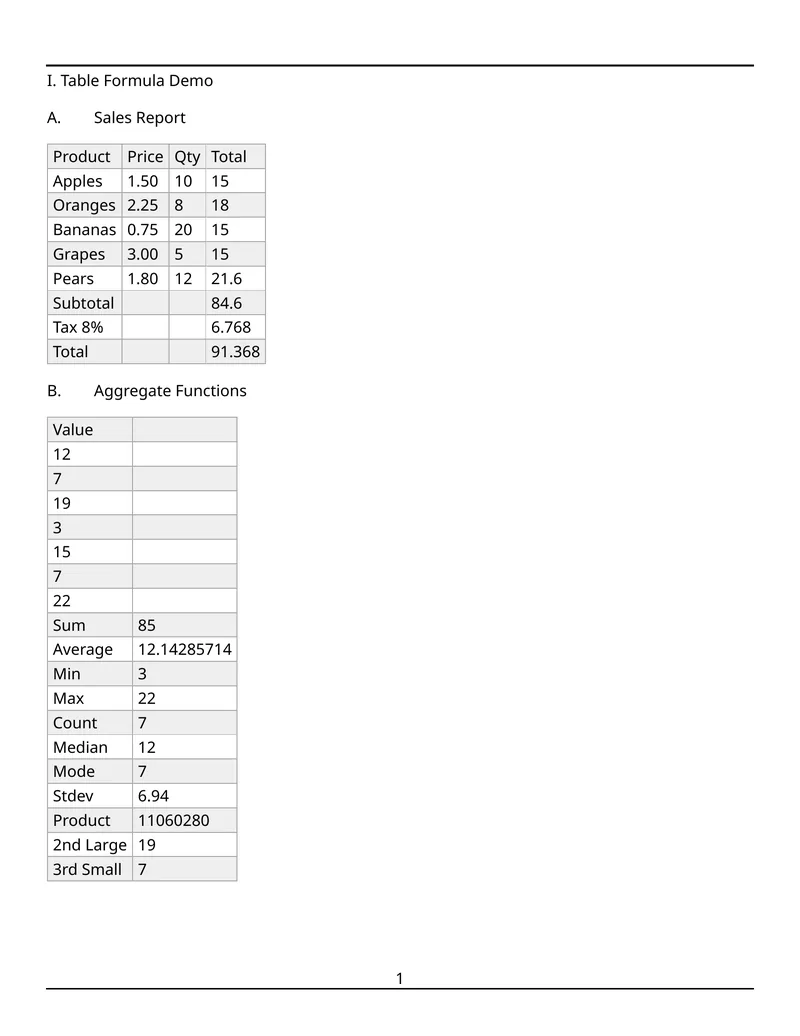
A pipe table takes the document's table style — here a banded header, hairline rows, and heavy top and bottom rules. The caption is citable: this is @tbl:ledger.
TBLCAP| Season ledger, with live formulas {#ledger}
| Line | Unit cost | Count | Extended |
| Field kits | 112.50 | 14 | =B2*C2=1575 |
| Relay masts | 480.00 | 6 | =B3*C3=2880 |
| Logger cable, m | 3.25 | 400 | =B4*C4=1300 |
| Calibration days | 260.00 | 5 | =B5*C5=1300 |
| Total | | | =SUM(D2..D5)=7055 |
| Mean line | | | =AVERAGE(D2..D5)=1763.75 |
| Largest | | | =MAX(D2..D5)=2880 |
| Over plan | | | =IF(D6>7000,D6-7000,0)=55 |
Formulas read like a spreadsheet — cell references, ranges, arithmetic, aggregates, and conditionals — and print their results in place.
### A Scoped Table Style
Tables under this deeper heading resolve a different table style — centered, open sides, heavy caps — without any change to the table text itself:
TBLCAP| Series statistics, per watershed {#series}
| Series | Mean | Deviation |
| North | 62.4 | 4.1 |
| Coast | 58.9 | 6.3 |
| Basin | 61.2 | 3.8 |
## Positional Selectors
The six paragraphs below share one style; everything that differs is selected by position — first, last, and every second — with a small-caps first word thrown in by a sub-block pseudo-element.
[Fea] Selectors address blocks the way CSS addresses elements.
[Fea] Every second paragraph of this role is tinted teal.
[Fea] The base style fills whatever a selector leaves unset.
[Fea] Ranges, steps, and scopes cover the practical patterns.
[Fea] Layering is per-field, most specific selector winning.
[Fea] And the last paragraph signs off in muted italic.
## Sub-block Styling
The drop cap that opened this part — and every part before it — is the most bookish trick in the set, and it is not typed into the text. A sub-block selector in the style sheet, the style named {=code=[#1_Bd.3:letter(3)]}, finds each part's third body block, the paragraph after the kicker and the lead, and sinks its first letter three lines deep. The prose stays clean; the trick lives entirely in the sheet.
[Init] A bare letter pseudo-element raises an initial without sinking it — sized by its own style, inline with the first line.
[Glow] The first typeset line of this paragraph carries small caps and a tint, and the effect ends exactly at the line break, wherever reflow puts it — resize the measure and the styling follows the line.
## Boxes, Icons & Marks
[Panel] A single-block box: this ordinary paragraph names a style whose block chrome draws a panel — fill, border, radius, accent bar — inset to the paragraph, with normal spacing outside.
[RuleRow] A bottom-only border is the list-separator idiom.
[RuleRow] Per-side borders switch each edge independently.
[RuleRow] Top plus bottom caps a category; all four is a box.
[Marked] The glyph in this paragraph's corner is a style icon on the nine-point box grid — content untouched.
[Sealed] And behind this paragraph, the document's mark is stamped as a watermark: centered, faded, and owned entirely by the style.
#### Inside a Section Box
A block style matching a heading style boxes the heading's whole subtree — this heading, this paragraph, and the list below share one panel.
- Boxes nest and layer by heading level
- Fills accept tokens and gradients
% ============================================================ PART VI
# Frames & Regions
[Kick] PART SIX OF SIX · THE PAGE, FRAMED
[Lead] A region is a column with author-declared geometry and its own flow: a sidebar, a band, a glass panel, a rail. This closing part declares fourteen frames across eight sets, routes prose into them, wraps text around them, and layers them — all from the style block.
Regions are the compendium's last instrument, and its quietest power. A named frame is declared beside the headers and footers — page furniture, riding the same counter — and content is routed into it from a style, exactly as every look in this book has been assigned. The geometry is always declared, never measured from the content, which is why a frame can narrow the body, paginate its own interior, and still never corrupt the flow around it.[idx:Concepts:Regions]
Watch the left edge. The dark strip running the full height of this page is the part's first region — forty points wide, rotated to read from the foot of the page, and bled through three trim edges. Each section that follows swaps in a new set of frames the way earlier parts swapped their running headers, and every demonstration narrates itself as it happens.
[SpineT] THE ORD COMPENDIUM · PART VI · A REGION IS A COLUMN WITH DECLARED GEOMETRY
[RSet] FRAME SET № 8 · PLACE=RIGHT · 118 PT · FIT=CONTENT
## Sidebars, Three Ways
The wide right margin of this book has carried sidenotes since Part One; a named region upgrades the same real estate to a true frame — chrome referenced from a block style by name, a content cursor of its own, and pagination that never drops a record. Content arrives three ways. The first is a single tagged line:
[SideNote] ① A tagged line routes one record into the frame.
The second is a bare style tag, which absorbs the lines that follow it as one group:
[SideNote]
② A bare tag opens a group.
Every line until a blank stacks here, in document order.
The third needs no style at all — an inline directive pair fences a span, the way a column region opens and closes:
REGION|side
③ These lines rode an inline fence — no style tag anywhere.
The fence closes; the body resumes.
REGION|1
And a heading style carrying the routing key takes its entire subtree along — the whole section, heading first:
### [SbH] The Field Card
This heading became the card's title, and this paragraph followed it in — a whole section, routed.
### The Measure, Resumed
The section route closed at the heading above, and the body owns the full measure again. When a routed run outgrows its frame it continues in the same frame on the next page — overflow is continue by default, loudly clipped or returned to the body only by request — and a frame placed outer or inner swaps sides with the binding on duplex stock.
[RSet] FRAME SET № 9 · TWO BANDS & A HUNG BADGE · ANCHOR=AFTER
## Bands, Stacked & Hung
[HeroK] MERIDIAN INSTRUMENTS · SEASON DOSSIER
[HeroT] The season, banded
[DeckT] The second band never states a position — its top snaps to the hero's bottom, and the badge hangs from the seam.
[BadgeN] 941
[BadgeL] INSTRUMENTS AFIELD
Three frames compose this page and only the first declares a vertical position. The gradient hero reserves the top of the page and centers its two routed lines in the band; the deck beneath it is anchored after the hero, so its top is the hero's bottom plus a gap; the badge is anchored after the deck and then lifted by a negative offset, which is why it straddles the seam.
The paragraph you are reading entered the page beside that badge and snapped to the wider left side of it — the rectangle reserves, the body wraps, and the text returns to the full measure the moment it clears the card's lower edge.
Reservation is set-wide: both bands push the body down by exactly their stacked heights on every page of this section, which is one page, because the next section declares the next set.
[RSet] FRAME SET № 10 · PLACE=XY · RESERVE=1 · WRAP=SNAP
## The Pull Panel
[PullT] “The rectangle states its geometry; the paragraph finds the wider side and keeps reading.”
[PullA] SIDE-SNAP · THE DEFAULT WRAP
A fixed rectangle is the bluntest of the placements — x, y, width, height, stated outright — and the most composed. The panel on the right of this page is one declaration: a reserved rect flush with the body's right edge, wearing a referenced chrome whose top corner is cut at forty-five degrees and whose left edge carries the part's terracotta bar.
This paragraph began above the panel at the full measure, entered its band, and narrowed to the left strip without a break in the line pitch — the straddling line keeps its natural position, and the wrap simply begins where the rectangle does.
Side-snap is the default answer to a hole in the text: the body takes the single wider side and leaves the narrow gap as whitespace, and any strip thinner than eight percent of the page is not generated at all — below that floor the band reserves the full width and the text resumes underneath.
Below the rectangle's bottom edge the measure widens again, and the page closes the way it opened, at full width, with the panel sitting in the text like a plate set into a wall.
[RSet] FRAME SET № 11 · WRAP=STRIPS · THEN TWO OFFSET RECTS
## The Mini-Span
[TileK] FIELD PLATE № 7
[TileT] The basin at dusk
[PrintQ1] “Last light on the basin.”
[PrintQ2] “Every arc, a season.”
[Flow] The photograph in the middle of this page is a reserved rectangle whose chrome is the image itself, cover-cropped into the frame by the referenced block style, with a routed kicker and title laid over the picture like a caption bar. What matters is the path your eye is on. With the strips wrap, the rectangle's band becomes a small span of columns: this sentence is flowing down the strip on the left of the photograph for the band's full height, and when it reaches the bottom it will rise to the top of the strip on the right and flow down again, exactly as a column region would read.
[Flow] The flow crosses block boundaries inside the band — this second paragraph carried on wherever the first one stood — and a run that ends mid-strip leaves the rest of the band white. A staggered pair under strips would fall back to the snap. The band ends there, and the text resumes underneath.
[Flow] Below, a different arrangement entirely: two prints set side by side and staggered — they share rows but never touch, and each declares the per-line wrap. Where a single print crosses a line, the line simply breaks around it; where the two share a row, the row splits into three — a fragment against each margin and a channel of words running between the prints — and every fragment keeps its justification. Each print also carries a short quote routed over its chrome — white on the terracotta, ink on the gold — the geometry declared underneath.
[Flow] Below the pair the measure knits back — three rectangles, three answers.
[RSet] FRAME SET № 12 · WRAP=BOTH · A CORNER OVERLAP
## Reading Across the Hole
[IsleT] ✦
[Isle2T] TWO RECTS · ONE UNION HOLE
[Flow] The both wrap is the classic picture-in-a-paragraph: every visual line runs across the page and jumps the hole, so the left and right fragments share a baseline and the reading order goes across, then down. The medallion below is a circle only in its chrome — a gold-ruled radial gradient with the oval and square bits set — while the wrap sees its declared rectangle, and each row of this justified paragraph is measured freshly against it.
[Flow] There are two reserved rectangles here, and they overlap at a corner: the pale circle and the small dark card riding its lower shoulder at a higher paint order. Overlapping regions reserve their union regardless of z, so in the shared rows this text jumps one merged hole; above and below the overlap the interval set changes as the rows sweep each frame's edge, and the justification is kept per fragment, on both sides, all the way down.
[Flow] Nothing about the paragraph knows any of this. It is body text with a style; the holes are furniture; and when the band ends the lines quietly reassemble to the full measure, as if the page had never been interrupted.
[RSet] FRAME SET № 13 · Z ORDER · GLASS · AN HONEST CLIP
## Layers & Glass
[GlassK] Z=2 · TINTED GLASS
[GlassT] Glass over the photograph — and the body never moved for either.
[VersoT] VI
[StubT] Clipped stub — five records enter.
[StubT] A fixed frame, parked out in the margin.
[StubT] Each record stacks toward the edge.
[StubT] The frame ends before the records do.
[StubT] What crosses the line is cut, loudly.
Regions may overlap, and an integer decides who paints on top. The photograph band above reserves the body's flow but paints above its plane; the glass card floats over the photograph at a higher z with an alpha fill, so the image reads through it; and the routed caption rides the glass in white.
Behind this paragraph, at z minus one, a region is painting the part's numeral in pale ink — the watermark plane, content the body reads straight over. And parked out in the right margin, a short fixed frame is demonstrating the one clip in the whole feature: its last records fall past the frame and are cut, with a warning in the render log, because a region is never allowed to lose content silently.
Three planes, one page: a watermark beneath the text, a photograph above the flow, glass above the photograph. The order is one integer on each declaration, and ties fall back to document order, so the stack is always deterministic.
[RSet] FRAME SET № 14 · RIBBONS & TIMELINES
## The Dossier Rail
[Rib] CONTACT
[RailB] Meridian Instruments Co.
[RailB] Field Office, Basin Camp
[RailB] dispatch@meridian.co
[Rib] STATIONS
[RailB] 22 on the high line
[RailB] 9 on the headlands
[RailB] 17 in the basin
[Rib] THE YEARS
[RailT] 2019 — the first unbroken season.
[RailT] 2022 — the network doubles.
[RailT] 2024 — one hundred stations.
[RailT] 2026 — the season in this book.
The navy rail on the left is a reserved frame, bled to the trim at its side and its foot, and everything inside it was routed from styles: the terracotta ribbons span the rail and overhang its edge by eighteen points — a per-block chrome extension toward and past the frame — and the year entries fuse their accent bars into one continuous white line with a node per record, the timeline treatment, running inside a frame.
The same treatment works at body scale. These four cards fuse into a teal rail beside the narrowed measure:
[TLine] Declared — the frame's geometry is stated in the sheet, never measured.
[TLine] Routed — content reaches the frame from a style, or an inline fence.
[TLine] Wrapped — the body snaps, strips, or reads across the hole.
[TLine] Layered — planes stack by one integer, and alpha does the rest.
A timeline is not a region and a region is not a timeline; the rail look is block chrome, the frame is furniture, and because the two are orthogonal you may have either, or both, in the same declaration — which is precisely what this page is doing.
[RSet] FRAME SET № 15 · NONE — THE FURNITURE CLEARS
## The Colophon
One last declaration closes the tour: this page's region set is the explicit none. The furniture clears, the frames are gone, and the page is one quiet column again — which is its own demonstration, because absence, too, is declared.
***
[Sign] Meridian
[SignSub] SET IN GARAMOND, MONTSERRAT & SPACE GROTESK · ONE MASTER STYLE
[Led]
Text styles defined | 120
Block styles defined | 56
Named regions declared | 14
Page sets in rotation | 15
The back matter that follows — the lists of figures and tables, and the index — was generated, not written.[idx:Concepts:Back matter]